
Color Flow - Color by Number
Coloring Game Studio@RabiGameBoard
4.6795.00 Reviews
- Version
- 1.9.55
- Installs
- 500.00K
- Age Rating
- Everyone
Screenshots

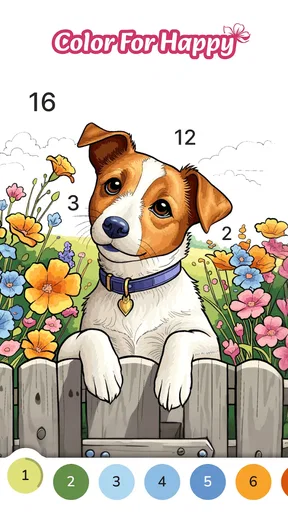
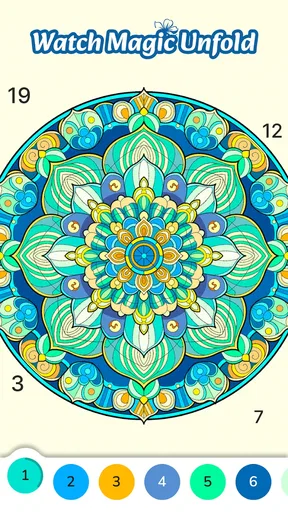
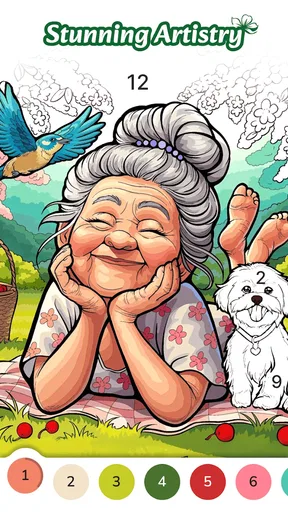
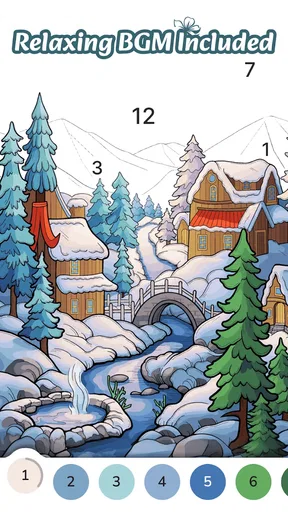
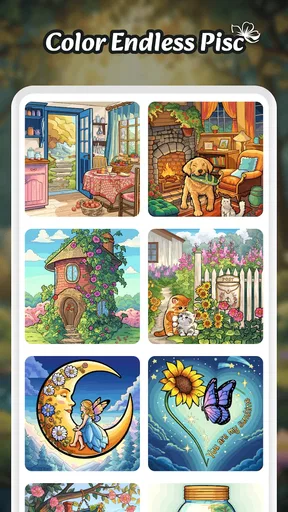
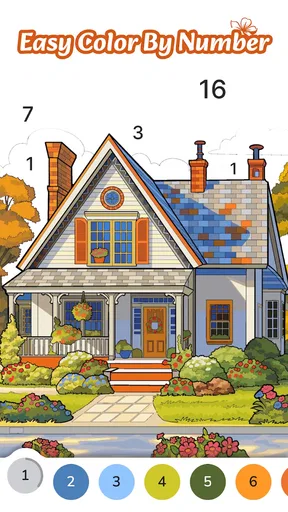

Our Review of Color Flow - Color by Number
 Analysis by Appyee
I tried Color Flow - Color by Number as a quiet, low-pressure board game rather than as a traditional puzzle challenge, and that distinction matters. Its central idea is simple: choose a numbered color, find the matching spaces, and gradually turn a blank illustration into a finished picture. The appeal is less about winning than about settling into a repetitive visual rhythm. When I want something gentle to do while listening to music or taking a short break, this is the kind of game I can open without first learning a complicated rule set.
The game is free to download and is suitable for Everyone, which makes it approachable for children, adults, and older players who prefer calm activities. It comes from Coloring Game Studio@RabiGame and sits in the board-game category, although its experience is closer to digital coloring than to a conventional board such as chess, checkers, or a card game. It has reached over five hundred thousand installs and holds a 4.6 average from around four thousand six hundred ratings, so there is already a sizeable audience behind the concept.
How the current experience feels in everyday use
The first thing I noticed is how quickly the game gets out of the way. There is no need to memorize a strategy, manage a character, or understand a complicated objective. I can begin coloring almost immediately, and the numbered structure gives me just enough direction to avoid staring at an empty canvas. That makes it especially comfortable for a short session when I have only a few minutes and do not want the pressure of a timed arcade game.
A realistic use case is an evening commute or a waiting-room break. I can work on a picture in small portions, stop when I reach my destination, and return later without feeling that I have abandoned a competitive match. The activity also works well beside a podcast because the visual decisions are straightforward. I would not describe it as a demanding mental workout, but it does offer a modest form of concentration: I scan the image, match a number, and keep my attention on small areas until the illustration takes shape.
The best part is the visible sense of progress. A nearly finished picture feels more satisfying than a page that remains mostly empty, and the numbered method prevents the common problem of not knowing where to begin. I also like that the process encourages patience. Instead of rushing toward a score, I can clean up small uncolored spaces and enjoy the gradual change from outline to completed artwork.
That same simplicity will not suit everyone. If you expect the board category to mean tactical decisions, competition, or meaningful choices that alter the result, this may feel too passive. The game is built around completing an image, not outsmarting an opponent. I would choose a conventional board game when I want planning, social interaction, or a clear contest. I choose this one when I want a structured way to switch off.
The coloring loop is relaxing, but not completely effortless
Color-by-number sounds automatic, yet the practical experience still depends on how carefully I look. Larger sections are quick to fill, while tiny areas require more precise taps and a slower pace. That creates a useful change of tempo: broad portions provide momentum, and detailed portions make me focus. In my experience, the small sections are where the relaxing mood can either become satisfying or turn into mild irritation, depending on how accurately the touch response recognizes the intended area.
My most useful habit is to avoid chasing every tiny gap as soon as I see it. I first fill the larger areas associated with the active color, then return to the edges and narrow spaces. This keeps the screen from feeling visually chaotic and makes it easier to notice what remains. I also find it better to work with one color at a time rather than jumping randomly between numbers. The result is a more orderly session and fewer missed spaces.
Another practical tip is to use short sessions for detailed pictures instead of trying to finish everything in one sitting. The game is naturally suited to stopping and resuming, and forcing myself to complete a complicated image can make a relaxing activity feel like a chore. For children, the numbered process can encourage careful observation, but I would still play alongside younger users at first to see whether the small regions are comfortable for their touch accuracy.
What the version and release history suggest
The game was released on September 22, 2023, and the current version is 1.9.55. That places it beyond its initial launch stage, which is useful context for anyone wondering whether the project is still being maintained as an active product rather than treated as a one-off experiment. A version number alone does not tell me exactly which improvements were made, so I would not assume that every update changes the core coloring system. What it does tell me is that the app has moved through multiple iterations since its first release.
For someone already using an earlier build, the practical expectation should be continuity rather than a completely different game. The main appeal remains the calm numbered coloring loop. If you enjoy that foundation, a newer version is likely to feel familiar rather than disruptive. If you were hoping for a major shift toward competitive board mechanics, the version progression should not be read as evidence of that kind of transformation.
I also appreciate that the minimum operating-system requirement is Android 6.0 or later. That makes the game accessible to many older Android devices, although actual comfort will still depend on screen size, touch responsiveness, and general device condition. On a small or aging phone, detailed coloring may be less pleasant than on a larger display. Before judging the game itself, I would make sure the device can register taps accurately, because precision is part of the experience.
Who gets the most value from it
I think this is a particularly good fit for people who like coloring books but want the guidance of numbered sections. It removes the pressure of choosing a palette and replaces it with a simple task that still produces a colorful result. It can also appeal to players who enjoy completion-based activities, provided they are comfortable with a slower pace and limited strategic depth.
Parents may find the Everyone rating reassuring, but the rating should not replace supervision or personal judgment. The game is easy to understand, yet a child’s enjoyment will depend on whether the images and small areas match their patience and motor control. An adult looking for a calm shared activity could use it as a quiet companion rather than as a competitive family game.
It is less suitable for users who need strong goals, leaderboards, multiplayer interaction, or a sense of escalating challenge. I would also skip it if I wanted a fully open-ended digital art tool. Here, the numbered design guides the result, which is precisely why it feels accessible, but also why it offers less creative freedom than a blank canvas app.
Free access and the point where friction may appear
The free entry point is important because it lets me test the coloring rhythm without committing money first. That is the right approach for this type of game: spend a little time with it, see whether the tapping and visual completion feel calming, and only then decide whether anything extra is worthwhile. The presence of in-app purchases ranging from $0.99 to $99.99 per item means the free experience should be considered separately from optional spending.
I would be cautious about treating optional purchases as part of the basic value. A relaxing game can lose some of its appeal if I feel pushed to pay in order to maintain momentum, unlock variety, or avoid interruptions. Since purchase sizes vary widely, I would check each item carefully before confirming anything, especially when letting a child use the device. The sensible workflow is to enjoy the free portion first and set a spending limit rather than buying impulsively during a long coloring session.
This is also where the game differs from a physical coloring book. A paper book has a one-time purchase and leaves me with a permanent object, while a digital game offers convenience and guided filling but may place optional content or other forms of friction around continued use. On the other hand, the mobile format is easier to carry, does not require pencils, and gives immediate feedback when I select the correct numbered area.
How it compares with other board and coloring choices
Compared with chess, checkers, or digital board games built around turns, this title asks much less of my strategic thinking. There is no opponent whose move I must anticipate and no match result to defend. That makes it a poor substitute for someone who wants competition, but a better choice for someone who finds competitive games tiring.
Compared with a conventional coloring app, the numbered system is both its biggest advantage and its main limitation. I get a clear route through the picture, which helps when I want relaxation without creative decisions. In exchange, I cannot freely choose every color or reinterpret the artwork in my own style. A traditional drawing app is better for experimentation; this game is better when I want the structure to do some of the decision-making for me.
Compared with a paper color-by-number book, the phone version is more portable and easier to start in a spare moment. The trade-off is that tapping a screen does not provide the same physical sensation as using a pencil or marker. People who enjoy the texture, sound, and permanence of paper may find a digital version less rewarding. I see the mobile option as a convenient companion, not a universal replacement.
Small workflow choices that improve the experience
I get better results when I treat each picture as a sequence of manageable passes. First, I identify the dominant or easiest number and clear its obvious areas. Next, I move through medium-sized sections, leaving the most delicate edges for the end. This approach reduces repeated searching and gives me a steady feeling of progress without turning the activity into a race.
For a more relaxing session, I lower the expectation that every image must be completed immediately. Ten quiet minutes can be enough. The game works well as a transition between demanding tasks because the repeated matching action occupies my hands while allowing my mind to settle. If I am already tired or impatient, however, tiny regions can feel bothersome, so I choose a simpler picture or stop before the activity becomes frustrating.
On a shared device, I would create a simple turn-taking routine rather than letting everyone tap at once. The numbered format is easy for another person to understand, but the small areas make accidental touches more likely when two people crowd the screen. A larger display is also preferable for family use. These are not dramatic changes, yet they make the difference between a calm shared activity and a session filled with corrections.
Remaining gaps and realistic expectations
The core loop is intentionally narrow. That is a strength when I want predictability, but it also means the game may start to feel repetitive for players who need constant novelty or deeper progression. The satisfaction comes from completing pictures, not from mastering a complex system. I would therefore judge it by the quality of its quiet moments, not by the standards of a strategy board game or a long-form adventure.
There is also a balance between guidance and freedom that will divide users. The numbered layout makes the game welcoming, but it limits personal expression. I cannot approach the same image with radically different artistic intentions in the way I could with a blank drawing surface. If your enjoyment comes from choosing unusual color combinations, this structure may feel restrictive rather than calming.
Device ergonomics are another important limitation. Detailed coloring on a small screen can require more zooming, repositioning, and careful tapping than a player expects. Older hardware that technically meets the Android requirement may still provide a less comfortable session if touch input is inconsistent. I would test a detailed image before deciding whether the game deserves a regular place on my phone.
What I would watch as the game continues
Because the current version is 1.9.55, I would pay attention to whether future updates improve the practical parts of coloring rather than simply adding more material. Better handling of tiny areas, smoother navigation through a picture, and a clear distinction between free content and optional purchases would matter more to me than flashy additions. Those are the details that determine whether a relaxation game remains pleasant after the first few sessions.
I would also watch how the developer, Coloring Game Studio@RabiGame, balances accessibility with variety. The game already has a straightforward identity, so meaningful evolution would ideally preserve the easy entry point while giving regular users reasons to return. New artwork can help, but variety is most useful when it does not make the interface harder to understand or turn the simple coloring process into a cluttered experience.
For existing users, the safest expectation is that the familiar numbered workflow remains the main reason to stay. For new users, the free download offers a low-risk way to decide whether that workflow fits their personality. I would not install it expecting a strategic board challenge or a full art studio. I would install it expecting a quiet, guided activity that can fill a short break without demanding much mental preparation.
My final view is positive but specific: this is best understood as a digital color-by-number retreat, not a traditional board competition. I like its quick start, gentle pace, and clear visual progress, and I can see why it has attracted over five hundred thousand installs. The 4.6 average is consistent with an experience that does one focused thing well, though it will not erase the limits of repetitive play, small-screen precision, or optional purchases.
If you want a calm game for brief sessions, prefer guidance over freeform drawing, and enjoy completing pictures one section at a time, I would recommend giving Color Flow - Color by Number a try. If you need multiplayer tension, deep strategy, or unrestricted artistic control, another option will serve you better. For my own phone, I would keep it as a low-pressure break game: easy to open, easy to understand, and most enjoyable when I let the picture develop at its own pace.
Verdict
Strengths of Color Flow - Color by Number
- Relaxing gameplay suitable for short breaks or longer sessions.
- Wide variety of coloring pages across multiple themes.
- Simple controls make it accessible for beginners and children.
- Completed artworks can be saved and shared with others.
- Color hints help when finding small or difficult sections.
Limitations of Color Flow - Color by Number
- Some advanced pictures may require watching ads or making purchases.
- Large coloring collections can take time to load on older devices.
- Frequent notifications may feel distracting without adjustment.
- Small sections can be challenging to tap accurately on phones.
- The experience may become repetitive for users seeking more variety.
Other Releases by Coloring Game Studio@RabiGame
View All
Color Master - Color by Number
Board4.7

Pixel Coloring-Color by number
Board4.4
Similar Picks in This Category
View All
Ludo King®
Gametion4.1

Ludo
Yarsa Games4.6

Tile Master® - Matching Game
Higgs Studio3.6

Checkers Online
CC Games4.6

Dominoes
Loop Games4.7

Chess
Chess Prince4.6
Frequently Asked Questions
What is Color Flow - Color by Number?
Color Flow - Color by Number is a relaxing digital coloring game for Android and iOS devices. It provides numbered illustrations that you complete by selecting the matching colors. The app includes a variety of categories and artwork, making it suitable for short breaks, stress relief, or anyone who enjoys creative activities without needing traditional pencils, paper, or artistic experience.
How does the coloring system work in Color Flow - Color by Number?
Each picture is divided into small numbered sections, and every number corresponds to a specific color in the palette. You select a color and tap the matching areas to fill them in. The game is generally easy to understand, although detailed images may require patience. Zooming and navigation tools are useful when working on tiny sections or complicated illustrations.
Does Color Flow - Color by Number require an internet connection?
Some features and artwork may be available offline after they have been loaded, but an internet connection can be required for downloading new pictures, updating the content library, displaying advertisements, or accessing optional online features. Availability may vary according to the version of the app and your device. It is best to open the app online first if you plan to use it while traveling.
Is Color Flow - Color by Number free to download and use?
Color Flow - Color by Number can generally be downloaded for free, but the free experience may include advertisements, limited content, or optional in-app purchases. Paid elements can provide access to additional artwork, remove advertising, or unlock other features. Before confirming a purchase, review the price and subscription details shown in your app store, especially if children use the device.
Is Color Flow - Color by Number suitable for children and adults?
The simple tap-to-color controls make Color Flow - Color by Number accessible to both children and adults, while the range of illustrations can appeal to different ages. However, parents should check the app’s age rating, advertising, privacy information, and purchase settings before allowing independent use. Some detailed pictures may also be more enjoyable for older children and adults.
Play our best games!


